When you arrive for a shift at a residential facility or treatment clinic, the day starts with the same questions: Who is here? Who arrives today? Has medication been given? And who needs something special remembered? In Validi, the answers live in one place — the client list, the screen most of our users keep open all day.
Three tabs: who is here, who is coming, and who has been here
At the top of the list you switch between Current, Upcoming and Past. Current shows the clients enrolled right now. Upcoming shows those with a start date in the calendar — so you can prepare the room, the medication and the welcome before they arrive. And Past holds the full history: no case ever disappears, and if a client is re-enrolled, everything is ready and waiting.
Need to find someone specific? Just search by name or CPR number (the Danish civil registration number) — including among closed cases.
Medication status without opening a single record
The medication column shows you at a glance where action is needed: a green "Given" when today's medication has been handed out, a red "Delayed" when a round is overdue, and a marker when a client has as-needed (PN) medication. Whoever starts the shift can see the medication picture for the whole house in one look — without clicking into each client.
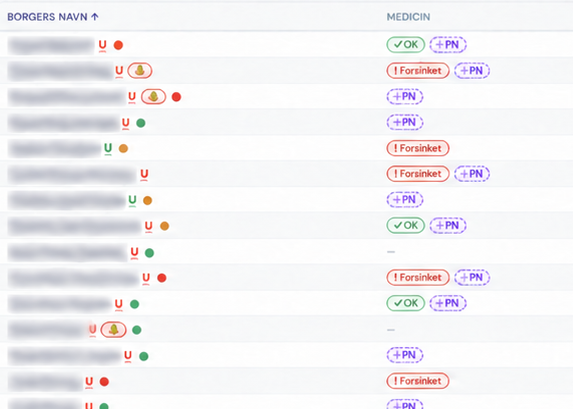
Client list detail showing medication status and PRN indicators in Danish. Service user names are blurred. Select the image to view the full-size detail.
Notes and review meetings right at hand
Next to the medication status sit the short notes colleagues have added: "Exempt from morning wake-up". "Only in the house on Wednesdays". "Noon medication is taken at 2 pm". These are the details that otherwise live on sticky notes and in the head of the most experienced colleague — here they sit right next to the client, where everyone can see them.
The list also shows the date of each client's next review meeting, so status meetings never catch anyone by surprise.
The whole case on a single line
Every client appears with their programme — for example residential treatment, outpatient treatment or a shelter stay under the relevant sections of Danish law — along with the start and end date of the case. You can also see which staff members are assigned to the client, and who is the primary contact. Nobody has to ask "who actually has Jacob?" — it's right there in the list.
And when a case ends, you close it directly from the list. The client moves to Past on their own, with their full history intact.
"Mine" — your own slice of the house
With many clients, you don't need to scan the whole list. One tap on "Mine" shows only the clients you are assigned to. You can also filter by programme or by a specific colleague — for example when you're covering someone's shift and want a quick look at who they usually work with.
One system, one overview
The client list is a good picture of how we think about Validi: records, medication, appointments and cases live in one system, so the overview doesn't have to be assembled from whiteboards, spreadsheets and memory. That means fewer errors, less double work and more time for what you're actually there for: the people in your care.
Want to see the client list with your own cases in mind? Book a no-obligation demo at validi.eu — we'll show you around.